

Preferences
To configure the Reporting component properly, it is important that at least one Assignment and Dial, Callback or Voicemail component is used in the flow.
Furthermore, if you wish to report by ring group, the component only allows the selection of a single ring group in the “Ring Group for reporting” field to make sure your interaction/contacts are reported on a single queue:
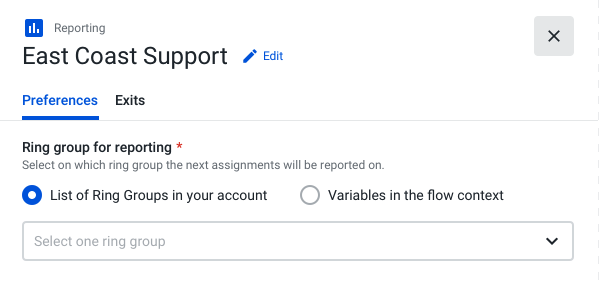
Depending on the position chosen to place the component in the flow, the component will have an impact when reporting either by interaction or by contacts.
Interaction Level Reporting
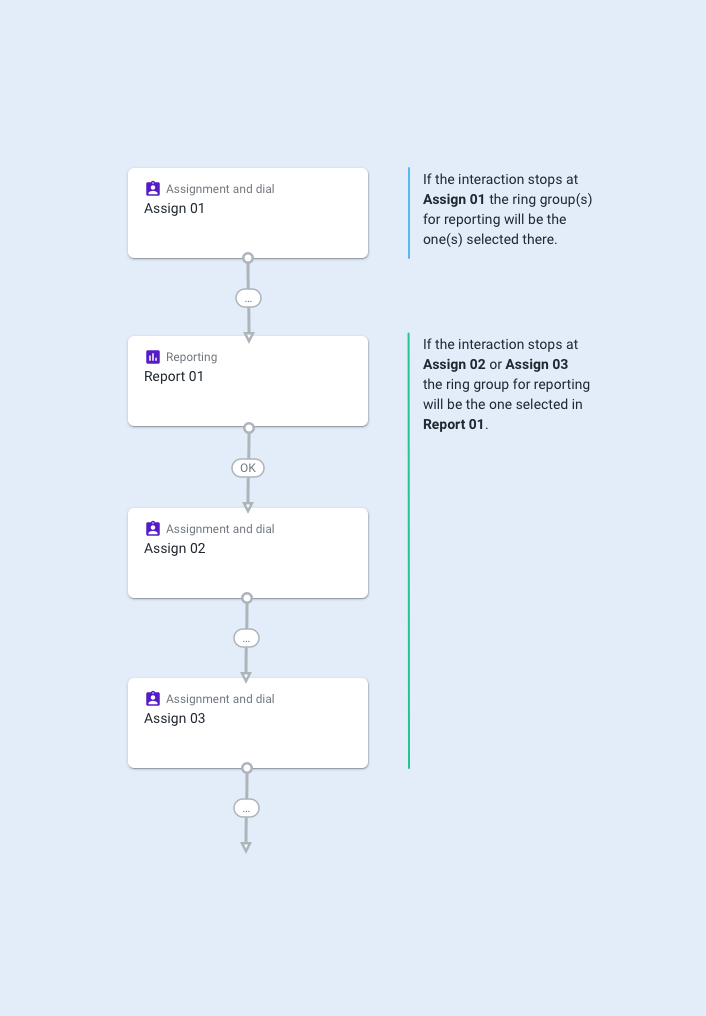
If no Reporting component is added, the interaction will be tagged with the last Assignment and Dial, Callback, or Voicemail component’s ring group.
If one Reporting component is added and:
- The interaction ends after it; the interaction is tagged with the Ring Group defined in that Reporting component.
- The interaction ends without passing through any Reporting component; it is tagged with the ring group defined in the last Assignment and Dial, Callback, or Voicemail component.
NoteIf this component is not added to the flow, your reporting will remain unchanged.
Contact Level Reporting
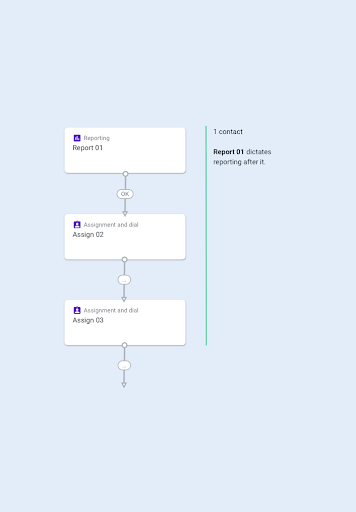
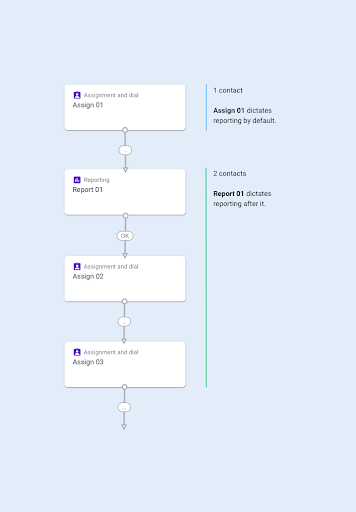
If a Reporting component is added, as shown below, one contact will be created with the ring group set in the reporting component “Report 01”:
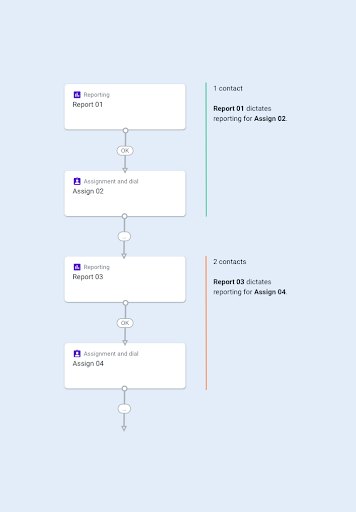
If two or more Reporting steps are added to the flow, each reporting step will create a new contact out of the interaction:
When the Reporting component is not used, the contact will be reported following the ring group that has been defined in the first Assignment and Dial, Callback or Voicemail components of your flow.
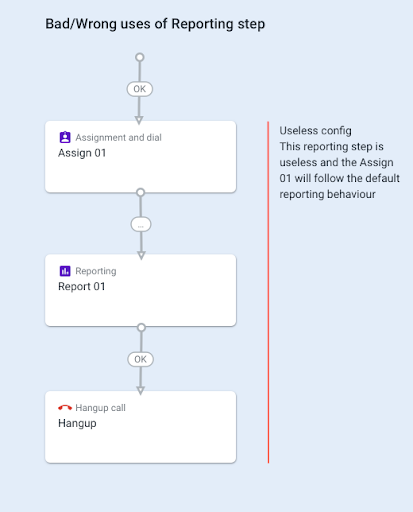
Note: Please be aware that the following misconfiguration scenarios will result in the component’s incorrect behavior and that no data will be displayed in the “Calls Report”:
- The Reporting component is added to the flow after the Assignment and Dial (for instance, before an IVR step):
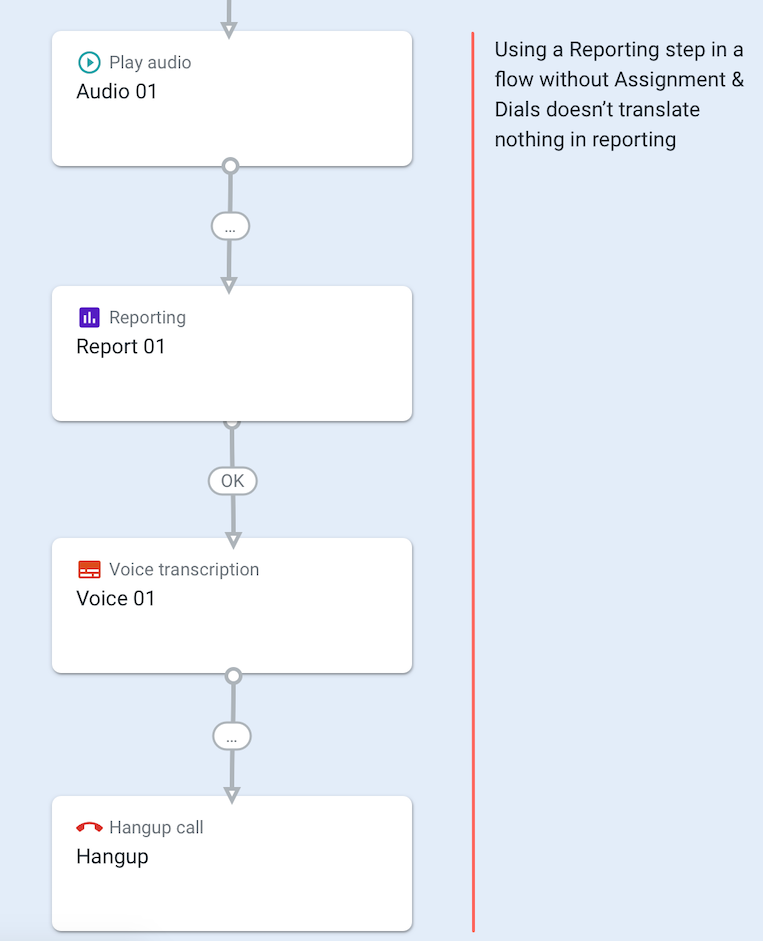
- The Reporting component is added to the flow, but no Assignment and Dial, Callback or Voicemail components are added:
Autopilot and Ring Group Reporting
The Reporting component does not populate the ring_group field for contacts handled by Autopilot or Virtual Agent components, regardless of where the Reporting component is placed in the Studio Flow.
Why This Happens
The Reporting component sets the reporting_queue_name for the next assignment step it precedes. However, Autopilot and Virtual Agent components are not considered assignment steps by the platform. Because only assignment steps trigger ring_group population in contact_started events, placing a Reporting component before an Autopilot step will not cause ring_group to be populated for any resulting Autopilot or Virtual Agent contact types.
Affected Contact Types
- Autopilot Success
- Autopilot Escalation
- Autopilot Abandoned
- Autopilot (default/general category)
Recommendation
If your flow uses Autopilot and you need to segment or filter contacts by queue in the Explore Contacts Report, use the Contact Type dimension instead of ring_group. The Contact Type dimension accurately identifies all Autopilot-handled interactions. For contacts that escalate to a live agent, the agent contact record (Contact Type = Autopilot Escalation, followed by an answered agent contact) will reflect the ring group of the assignment step that handled the escalation.
Updated 4 months ago