

Arguments
The arguments are customizable parameters that come in the request, for example, the chat user-defined variables. You can input the argument name, map the argument to a flow variable, and then use the variable in a later flow.
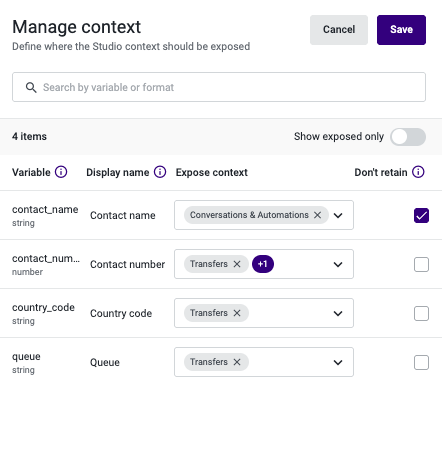
Manage Context
By clicking the icon on top left of the studio flow, you can manage context and define what context will show up to the agent or be transferred.
Expose context
You can choose to expose the context in Conversations & Automations or be passed in a transferred flow.
- By selecting “Conversations & Automations ” for “Contact name”, the agent will be able to see the name that the visitor selected instead of seeing a Visitor number. By selecting “Contact number”, the agent can click-to-call the visitor if they provide their number. By selecting a URL variable, the variable will appear as a clickable link in the context card.
- By selecting “Transfers” for Queue, the variable can be passed to the flow that the interaction transferred.
Retain
By default, variables are retained and stored according to the retention period configured in Storage and Retention. The minimum retention period is 4 days, meaning variables will be preserved for at least this duration.
If you do not want a variable to be retained as the retention period configured in Storage and Retention, such as 1 month, select the corresponding checkbox. This ensures the variable is only retained for the minimum retention period: 4 days.
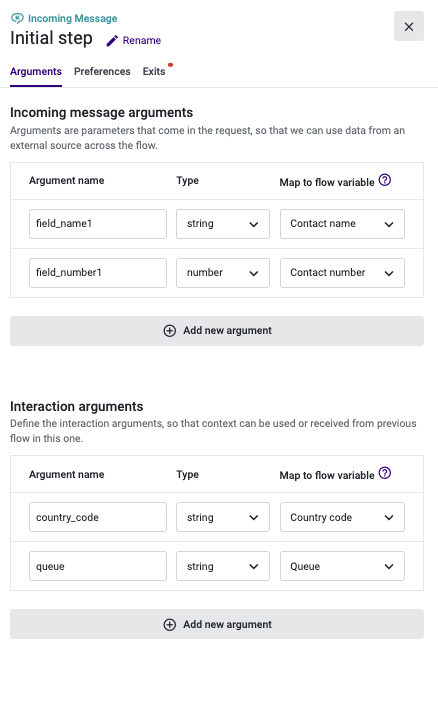
Incoming message arguments
Incoming message arguments allow you to map information collected on the chat widget’s initial screen into your Studio flow. For example, if the initial screen asks visitors for their phone number, you can pass that value as an incoming message argument and map it to a variable in Studio. This variable can then be reused throughout the flow.
Argument name
On the argument name, we should copy the value that shows up on the Appearance tab on the “Studio argument” section.
Variable name
On the variable name, the following naming should be applied:
- field_name1 -> Contact name
- field_number1 -> Contact number
- field_email1 ->Contact email
For other arguments, any other variable name can be applied.
Interaction arguments
Interaction arguments allow a flow to receive context variables from a previous flow. For example, if a previous flow defines a “queue” variable as an interaction argument and its “Expose context” setting in Manage Context is set to “Transfers”, then the “queue” variable can be received and used by this flow.
Updated 8 months ago