

Preferences
Switch Contact requires three mandatory inputs and can also accept Reporting Extra Fields when reporting metadata is needed. All mandatory inputs must be populated from variables set by an upstream component.
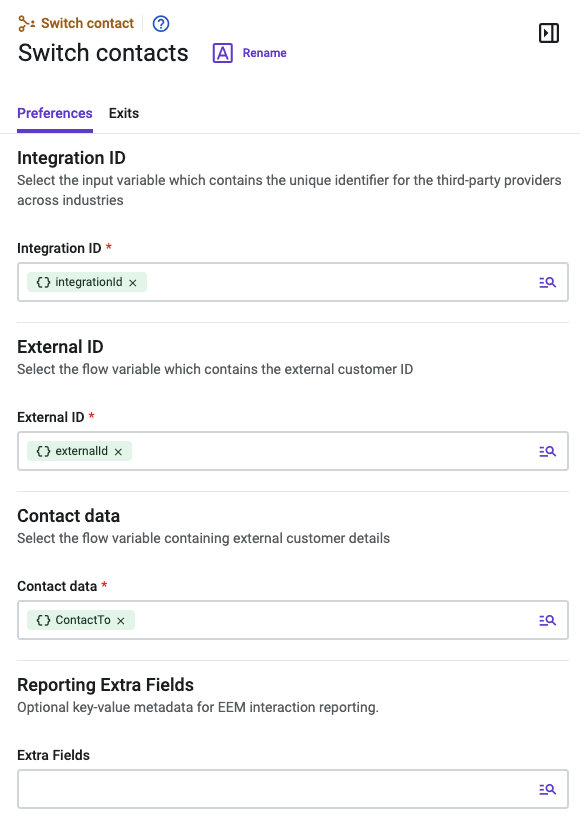
Inputs
| Input Field | Description | Required |
|---|---|---|
| Integration ID |
The unique identifier for the third-party provider across industries. Identifies which external system the `externalId` belongs to. Populated by parsing the Contact Lookup API response. Example: `"shopify"` |
Yes |
| External ID |
The verified external customer identifier from your CRM or commerce platform. Used to look up and resolve the contact record. Example: `"9405971431767"` |
Yes |
| Contact Data |
A serialized object containing external customer details (name, emails, phones, and so on), sourced from the Contact Lookup API response. Used to update the contact record at the point of resolution. Example: `'{'{"name":"John Doe","emails":[{"label":"Email","email":"[email protected]"}],"phones":[{"label":"Phone","number":"+10000000000"}],"tags":[],"integrations":[{"integration_id":"shopify","external_id":"9405971431767","external_url":"https://example.myshopify.com/admin/customers/9405971431767","contact_type":"contact","external_sync_state":"2025-01-01T00:00:00.000000000"}],"custom_fields":[]}'}'` |
Yes |
| Reporting Extra Fields | A JSON-serialized flat key-value map that enriches reporting dimensions for Switch Contact flows. Use this input when the flow needs to pass reporting metadata with the contact switch. The value should be prepared in an upstream component, such as Run Function, and selected through a Studio flow variable. Examples by industry: HLS Providers {"external_entity_birthdate": "1990-01-31","PATIENT_MRN": "MRN-12345"} FSI Banking {"external_entity_birthdate": "1990-01-31"} FSI Insurance {"external_entity_birthdate": "1990-01-31"} |
ImportantAll three inputs must be non-empty. If any value cannot be extracted from the Contact Lookup API response, terminate the flow before this component. Do not pass empty strings to Switch Contact.
Reporting Extra Fields must be a JSON-serialized flat key-value map. Keys and values should be strings.
Updated 4 days ago